


Use your file navigation system to create a folder anywhere on your hard drive.

Mac users please download from here.


Linux users please download from here. This is required to run the Energia IDE not as root.
sudo mv /71-ti-permissions.rules /etc/udev/rules.d/Mac users please download from here.


Windows users please download from here.


Linux users please download from here.


File → Sketchbook, and you should see the Classes 2B_3A,
ENGR 131, and LaunchPad_Grove_Kit folders with sketches available to use for class.

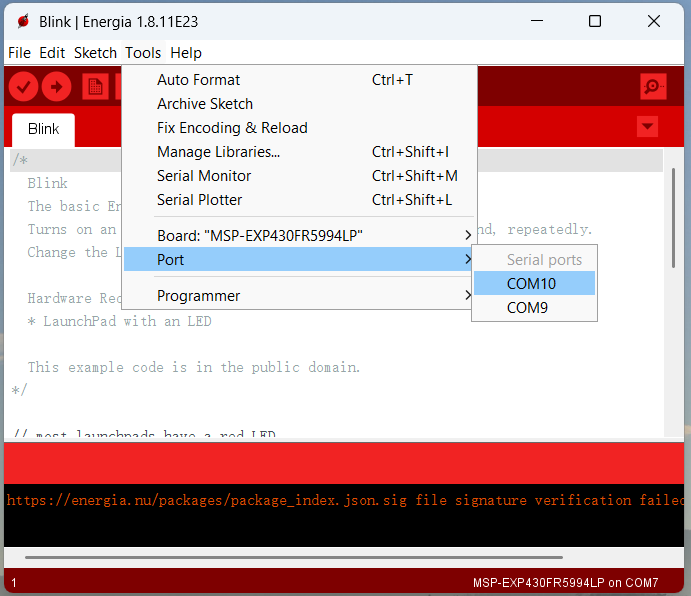
Tools and set the following:
Board → MSP-EXP430FR5994LP

Port → Select the port that corresponds to your laptop’s USB/Type-C connection.
If you are unsure which port it is, try each option until the board is detected.
Tools → Board → Board Manager.
Under MSP430 dropdown menu, select the latest version. 
Here are common problems and their solutions.
Tools → Board → Board Manager.
Under MSP430 dropdown menu, select the latest version. ⚠️ Please note: If you already installed the standalone drivers and Windows still does not recognize your LaunchPad, using either UniFlash or CCS should resolve the issue by updating the drivers automatically.
Click on an activity to expand and view details:
Objective: In this activity, you will practice controlling the built-in LEDs on the MSP430FR5994 by programming them to turn on, blink at different speeds, alternate, and follow simple patterns. You will also measure the timing of the blinks with a stopwatch to see how human error affects consistency, then analyze your results using basic statistics. By the end, you’ll gain hands-on experience with both programming a microcontroller and evaluating real data to support design decisions.
Tasks:
delay(2000).Source File:
Objective: This activity is to introduce you to using the TI MSP430 LaunchPad, Grove board, buzzer, to design a simple alert system. You will practice writing and modifying selection structures (if/else logic) to control how the buzzer responds to different conditions. This will help you understand how decision-making in code can be used to build real-world warning systems.
Tasks:
Source File:
Objective: The purpose of this activity is to guide you in designing a simple early warning system, inspired by the real-world failure of the Taum Sauk Reservoir, where human error and lack of safeguards led to disaster. Using an ultrasonic ranger, you will measure the distance to an object and apply a selection structure in your code to decide whether to trigger a buzzer alert when the object gets too close. This hands-on project shows how sensors and logic can work together to prevent accidents by warning operators before a threshold is crossed. To evaluate how reliable your system is, you will also test its fidelity by calculating the percent error and sum of squared errors (SSE) between your measured distances and the theoretical threshold. Through this, you’ll not only practice programming and hardware integration but also see how engineers assess accuracy and safety in real systems.
Tasks:
Source File:
Objective: Design and test a simple alarm system using the MSP430-Grove board to simulate how early detection of high water levels could have prevented the Taum Sauk Reservoir failure. Students will use an ultrasonic sensor to measure distance, a buzzer to trigger an alert when the water level is too high, and Excel Data Streamer to visualize data in real time.
Tasks:
Source File:
Objective: The purpose of this activity is to guide you in building a smart lighting system that responds intelligently to environmental changes. Using a light sensor, you will detect ambient brightness, and with an ultrasonic ranger, you will detect nearby objects. By applying logical operators (AND / OR) within your code, you will combine these sensor inputs to control when an LED turns on — for example, turning on the LED only when it is dark and someone is nearby. This project demonstrates how multiple sensors can work together through simple logic to enable more responsive and energy-efficient systems, similar to those found in real-world smart homes and safety applications. Along the way, you will also explore different logic structures, observe their effects, and reflect on how system behavior changes with different conditions.
Tasks:
Source File:
Here are some resources that could be useful: