SYNOPSIS
vat [-m 0|1|2]
OPTIONS
-m New VAT modes:
0 - the original VAT
1 - teacher mode. VAT interface looks the same, but when user name
is clicked, the option menu of its
enabling or disabling appears. The user interface is reconfigured slightly
(instead of buttons at the
bottom, there are now menus at the top. The color scheme is also changed).
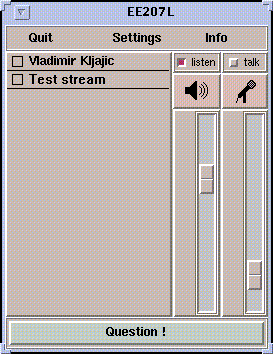
2 - student mode. VAT interface changes to enable question asking
(see Figure).
X RESOURCES
-Xmoderator - if set, defines a conference moderator e.g. -Xmoderator=kljajic@128.46.138.173
OPERATION
Teacher Mode
When in this mode, VAT can send or receive special type of 'lecturing'
messages. When it receives message from a user indicating he/she has a
question, the color of the student's name changes to cyan, with a black
background (if the user decides to withdraw the question, the message is
sent and the color returns to normal). If user's name is clicked, a popup
menu choices of enabling a user's transmission, disabling it, or getting
more information about the user appears. Once enabled, the user's name
becomes green indicating that the user can now transmit.
VAT enables the conference bus and listens to VIC. When
VIC is started in either the student or the teacher mode, it sends
a "hello" message over the bus, to which VAT re-plies and VIC
then reconfigures the interface appropriately (see the VIC section).
There are menus the top of the window. Settings replaces the old "Menu"
button while "Info" menu contains the "About" information and "Help", replacing
the "Help" button.
Student Mode
Again, VAT can send or receive lecturing messages. In this case,
the user interface reconfigures itself - there is a menu at the top, the
same as in the teacher mode, and a new "Question" button at the bottom
of the window. The default text within that button is "Question?", but
when it is depressed it becomes "Question!", changing color, and indi-cating
that the question message has been sent. If depressed again, it toggles
back to the default state, sending a question cancellation message.
When the question message from another user is received, his/her name
becomes cyan, and when the user is enabled by the teacher, it turns green.
If the Xmoderator re-source is specified, only messages coming from the
moderator (enabling or disabling us-ers) are accepted. If enabled by the
moderator, the transmit button is automatically in-voked, thus starting
the transmission immediately.
All new sources are muted by default, unless they are specified in
the Xmoderator re-source or an "enable" message for their activation comes
from the moderator (teacher).
Note: When VAT starts in the student mode, the transmit
button is disabled until an "enable" message from the teacher arrives.
It is invoked and enabled after that, until the "disable" message arrives.
Floor Control
Since VAT acts as a floor control manager, it manages VIC
in both new modes (teacher and student). When VIC is run in
the teacher or student mode, it mutes all new video sources by default
and unmutes them only when VAT's command is issued over the conference
bus.
vic [-r 0|1|2]
OPTIONS
-r 0 - original VIC
1 - VIC in teacher mode. No visible changes. All new sources are
muted by default, but it is possible to
unmute them (mute button is enabled).
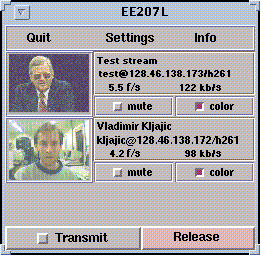
2 - VIC in student mode. The user interface is simplified (see Figure).
All new sources are muted by
default, the mute button is disabled and only a command from VAT can
enable the source.
Note: -r is used instead of -m, as in VAT, because -m
option is used in VIC and in or-der to maintain compatibility with
standard versions, the unused switch had to be utilized.
OPERATION
Teacher Mode
Apart from the color palette fix, no user interface changes were done to VIC. All new video sources are muted by default and are automatically unmuted when the user is en-abled by using VAT (VAT sends "enable" message over the conference bus). The source can also be unmuted manually.
Student Mode
The user interface is reconfigured, with a menu bar on the top, replacing
the "Quit", "Menu" ("Settings" menubutton) and "Help" buttons from the
standard main window. The "Transmit" and "Release" buttons are now on the
main window instead in the auxil-iary control window, as well as the "Look
Who's Watching" menubutton, which is used instead of the "Global Stats"
from the auxiliary control window.
Transmit is enabled by default, until the VAT application running
in student mode is detected over the conference bus, in which case it becomes
disabled and it remains so until the "enable" message from VAT is
received.
The mute button is disabled until the source user is enabled by the
teacher (session moderator), at which point it becomes unmuted and enabled.