ECE 462 Fall 2010,
Group Programming Assignment
Stage 2 (Java) Graphical User Interface
Under Construction. If you find any mistake in this page, please inform the instructor. Thank you.
Summary
This stage asks you to create a graphical user interface (GUI) so that a player can control the cube using buttons and the cube's faces are shown.
Graphical User Interface
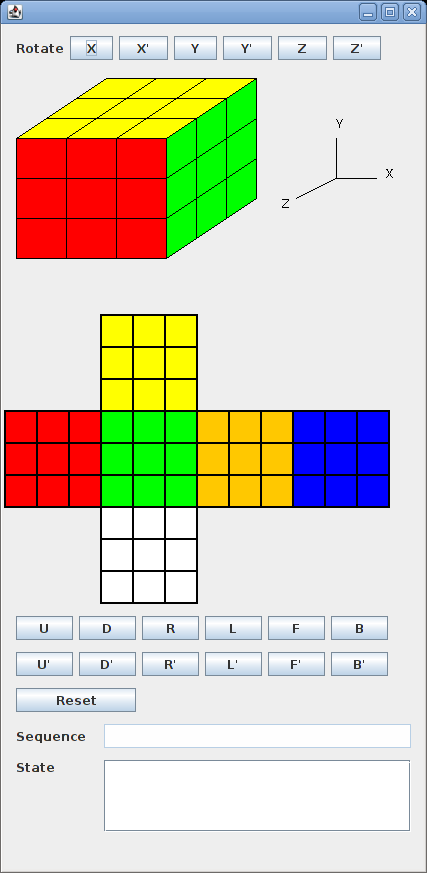
The following is a reference graphical user interface. You can design a different GUI as long as it meets all requirements.
Requirements
Your team needs to write a Java program (C++ not accepted) that contains
- at least 19 buttons: X, X', Y, Y', Z, Z', F, F', R, R', U, U', B, B', L, L', D, D', and RESET. The program may have additional buttons.
- a 3-D view of the cube
- a 2-D view of the cube
- a text area that shows the sequence of commands entered by the buttons
- a text area that shows the states after executing each of the command in the sequence. Neither text area allows a user to input anything. In other words, the text areas are for output only.
When a button is pressed, the 3-D and the 2-D views should show the correct state. The command is appended to the end of the first text area and the cube's state is added to a new line in the second text area.
When the RESET button is pressed, the views return to the initial state (as shown above). The contents in the two text areas are cleared.
Grading
Both the text areas and the views are graded. In each test case, all four (2 views and 2 text areas) must be correct to receive the point.
- 0.1, pressing the RESET button resets the cube to the initial state
- 1.8, (18 test cases) each of the 18 turn and rotation commands from the initial state
- 1.0, (10 test cases) sequences of up to 4 turn commands (without rotation) from the initial state
- 1.0, (10 test cases) one rotation command followed by up to 4 turn commands from the initial state
- 1.1, (11 test cases) a sequence of up 6 commands that may include multiple rotations and turns from the initial state
|

